Bookings[email protected] San Antonio · Texas
Obsidian vault · For busy brains who want a calmer plan

One calm page for the whole day.

A brain-dump inbox, small next steps sorted by energy and time, routines, habits, goals, bills and a gentle weekly reset, in one Obsidian vault. ADHD-friendly design: one visible next step, quick capture and no-guilt restarts.

Instant downloadWindows, Mac, iPhone, AndroidNo plugins12 months of updates

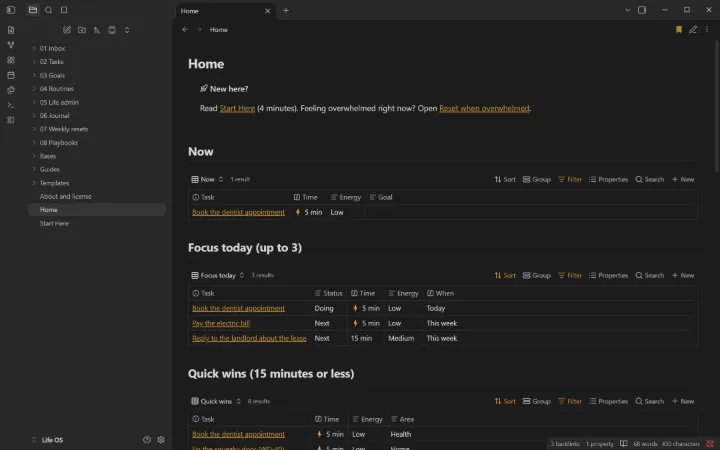
The Today page: now, focus today, quick wins and the inbox.
6templates
22ready-made views
10short playbooks
0plugins needed
What’s inside

Everything in one vault.

I

Today page

What you’re doing now, up to three focus tasks, quick wins and bills coming up.

II

Brain-dump inbox

Capture anything in seconds and sort it later.

III

Tasks by energy

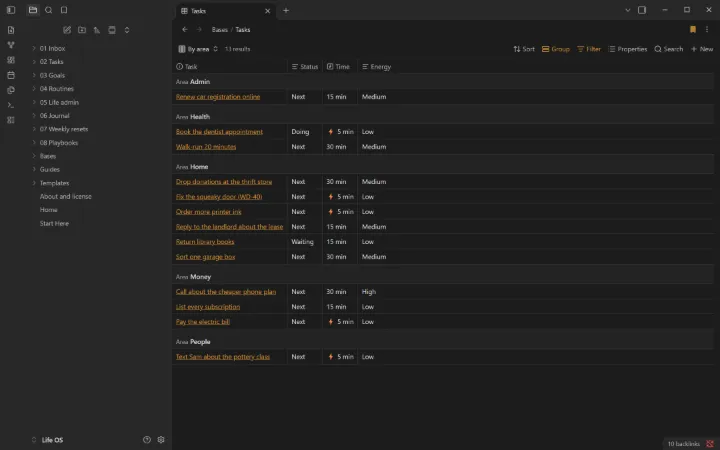
Every task has an energy level and minutes, so you can pick one that fits right now.

IV

Goals

A few that matter, each with a why and its next steps.

V

Routines

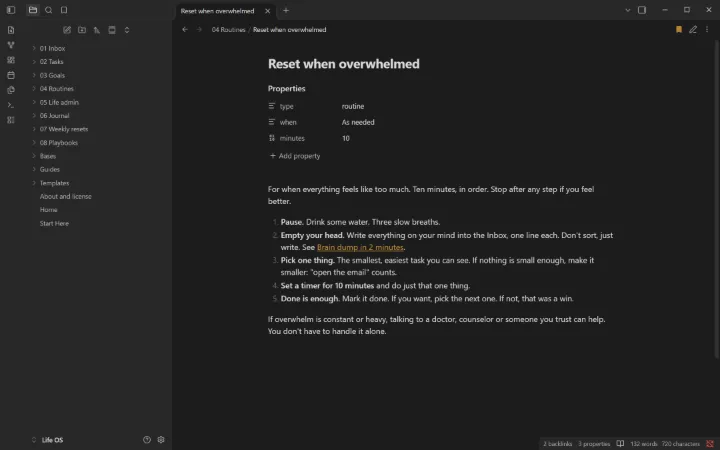
Morning, evening shutdown, leaving the house, Sunday reset, and a 10-minute reset for overwhelm.

VI

Life admin

Bills, renewals and appointments: due in 14 days, monthly costs and autopay gaps.

VII

Journal and habits

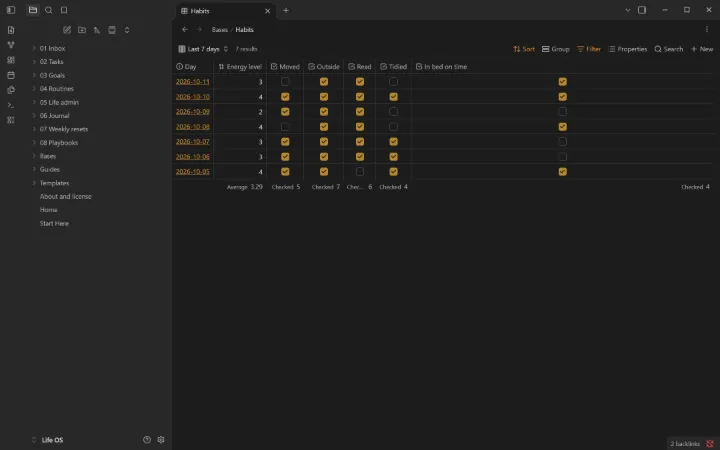
A daily top 3 and five habit checkboxes, with a 7-day view.

VIII

Weekly reset

A gentle 20-minute review. Missed a week? Start from today.

A closer look

Real screens from the vault.

Fictional sample data is included so every view shows something on day one. Clear it from one list when you’re ready.

Tasks grouped by area, with time and energy.
Seven days of habits, counted at the bottom.
A 10-minute reset for when it’s all too much.
How it works

Three steps, about five minutes.

  1. Buy and download. You get a ZIP right after checkout. Keep the page: the link works for 12 months of updates.
  2. Open it in Obsidian. Install the free app, choose “Open folder as vault” and pick the folder.
  3. Start at Home. Read “Start Here”, add your first real item, and clear the samples when you’re ready.
Built to last

No plugins. No lock-in.

  • Only Obsidian’s built-in features, so it works with Restricted mode on and survives updates
  • Plain Markdown files you own and can open with any app
  • Works on your phone the same as on your computer
  • Start Here guide, cheat sheets, and fictional samples to learn from
  • Made by Golden Rock, a technology partner in San Antonio
Try it free

Start with Life OS Lite.

A free, smaller edition you can keep and share. If it helps, the full vault picks up where it stops.

Download Life OS Lite, free

The Today page, a brain-dump inbox, tasks by energy and time, and the overwhelm reset. No email needed.

Questions

Straight answers.

What is Obsidian?

A free note-taking app for Windows, Mac, Linux, iPhone, iPad and Android. Your notes are plain files on your own device, not in someone else’s database. Get it at obsidian.md.

Do I need plugins or coding?

No. Everything uses Obsidian’s built-in features (Bases, templates, daily notes), so it works with Restricted mode on, works on your phone, and keeps working when Obsidian updates.

What exactly do I get?

A ZIP with the complete vault: templates, ready-made views, guides, and fictional sample data you can clear from one list. Open the folder in Obsidian and the Home page appears.

Is it a treatment for ADHD?

No. Life OS is a planning tool, not a medical product, and it doesn’t diagnose or treat anything. Its design follows tips many people with ADHD say help: small steps, fast capture, timers and restarting without guilt.

Can I change it?

Yes, all of it. Rename statuses, add fields, delete what you don’t need. It’s yours to keep.

Does it work on my phone?

Yes. Use any sync you like (Obsidian Sync, iCloud or a free option); a guide inside compares them.

What if it isn’t right for me?

Email us within 14 days of buying and we’ll refund you. No form, no argument.

Is my data private?

Yes. The vault runs on your devices and we never see your notes. It’s designed to never hold passwords or ID numbers.

Do I get updates?

Yes, free for 12 months: re-download from the link on your purchase page.

Who made this?

Golden Rock, a technology partner in San Antonio, Texas. Not affiliated with or endorsed by Obsidian (Dynalist Inc.).

Also available

More vaults.

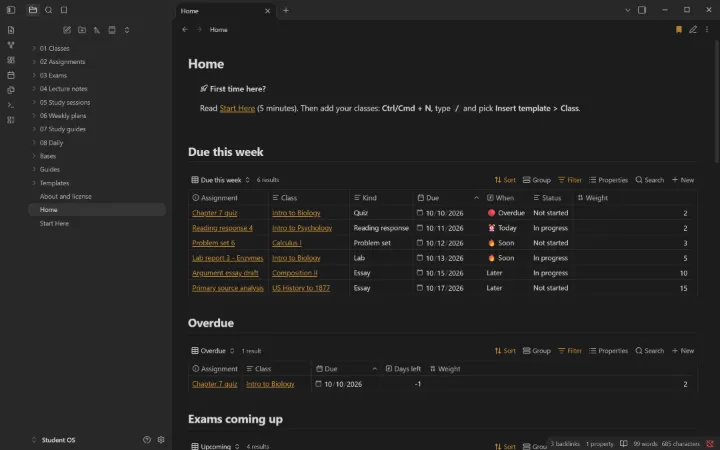
Student OS Home page in ObsidianFor high school and college students

Student OS

Classes, assignments, exams, lecture notes and study time. One Home page shows what’s due this week.

  • Due this week, overdue and exam countdowns
  • Lecture notes with questions for testing yourself
  • 10 study guides built on well-supported techniques
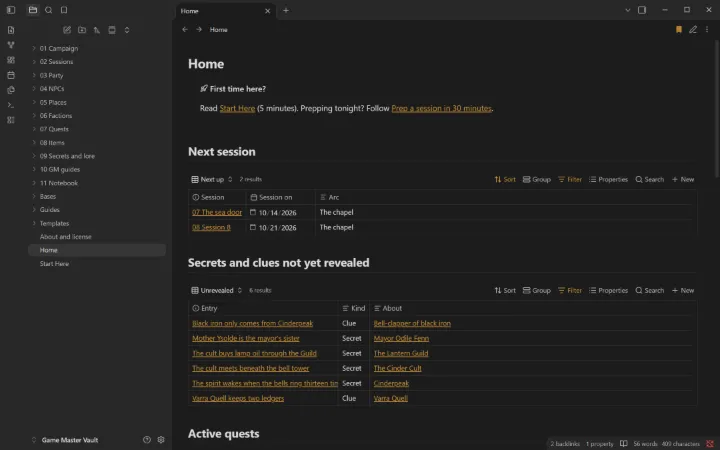
Game Master Vault Home page in ObsidianFor game masters running tabletop RPG campaigns

Game Master Vault

Session prep, NPCs, places, factions with clocks, quests, items and a secrets-and-clues tracker. Any system.

  • Secrets and clues not yet revealed, on one page
  • Place, faction and session pages that list who’s there
  • 8 GM guides, from 30-minute prep to session zero